MultiPurpose Game Lagger
A small Windows app for choosing an application and controlling its network connection during your own testing.
Roblox is available first, or you can choose another app on your computer.
Features
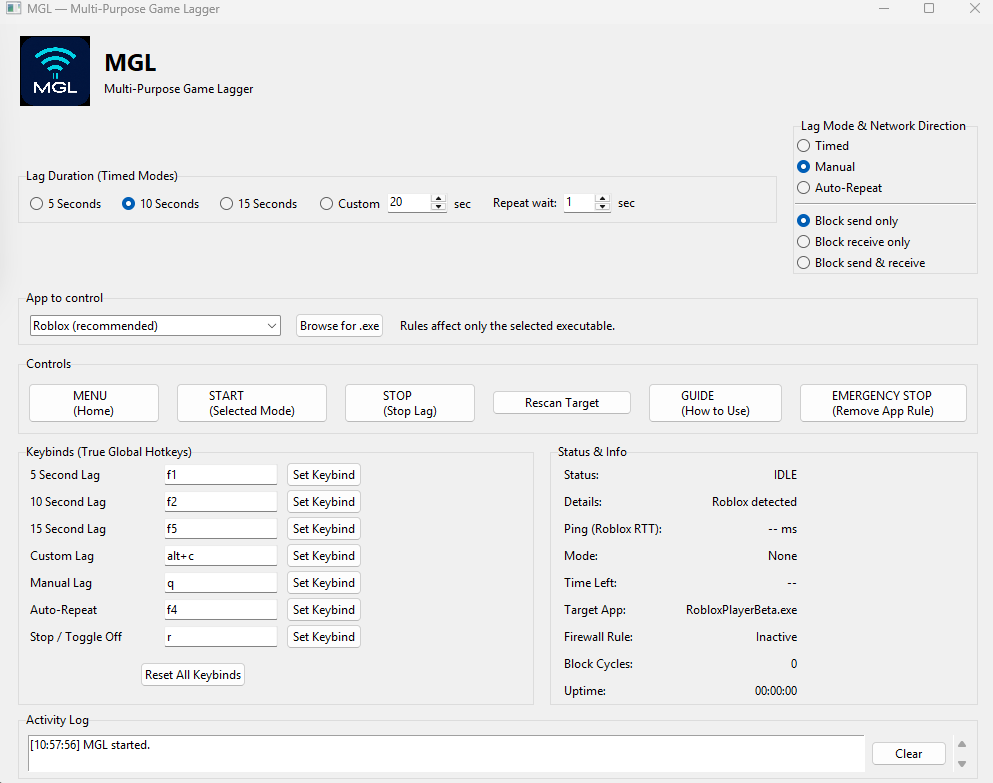
- Timed pauses: 5, 10, 15, or a custom number of seconds.
- Three control modes: Timed, Manual, and Auto-Repeat.
- Choose to control sending, receiving, or both network directions.
- Global hotkeys work even while MGL is minimized.
- Emergency Stop immediately removes the active rule.
Watch MGL videos, updates, and showcases.
▶ YouTubeNeed help? Join the MGL support server.
Discord SupportHow it works
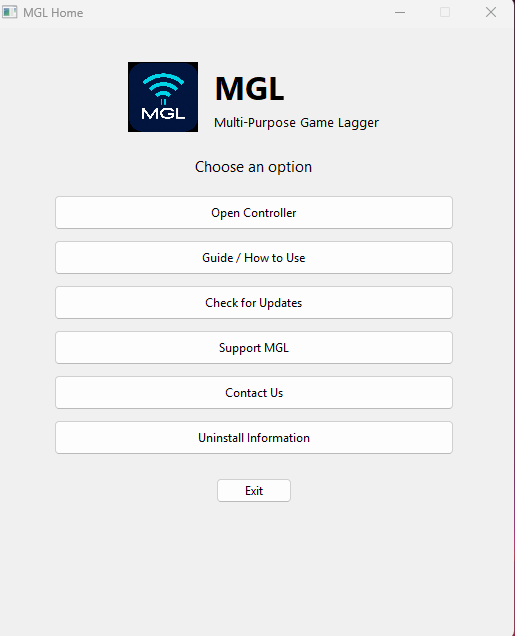
- 1. Choose an appSelect Roblox or browse for another Windows app.
- 2. Choose a modePick a connection direction and, if needed, a timed duration.
- 3. Start or stopUse the controller or hotkeys. Emergency Stop removes the app rule.
Support MGL
Please consider disabling your ad blocker on this site. Ads help support MGL updates and keep the download free.
Security & scanning
MGL was built and repeatedly tested by its developer. Its network-control features may trigger warnings from some antivirus tools. You can view the VirusTotal scan before deciding whether to download.
View the VirusTotal scanScreenshots
Unique visitors—Unique browsers counted live
Community downloads—Download starts tracked live
Download for Windows
Current release: MGL v2.2.